eCommerce
WooCommerce compatibility
TestedTested on a store with 200 real products in four categories, with seven other plugins active at the same time. The product image and product gallery pickers show the folder tree. CSV import matches image URLs to files already in the library instead of uploading them again. Bulk edit and export leave folders alone.
Versions and environment
| WordPress | 7.1 (9 Sep run) and 7.1.1 (22 Sep check) |
|---|---|
| PHP | 8.4.6 |
| Plathix | 1.0.0 Free (build 2ad782a8, 8 Sep 2026) |
| WooCommerce | 11.1.1 for the 22 Sep gallery check; 11.0.1 in the August run |
| Also active | ACF Pro, MailPoet, LearnPress, Admin Columns Pro, Download Monitor, Rank Math, Enhanced Media Library |
| Store size | 200 products, 4 categories, every product with a photo |
| Test run | FREE-REGRESSION-2026-09-09, product gallery picker checked on 22 Sep 2026, browser automation against a live site |
What was checked
| ID | What we did, and what happened | Result |
|---|---|---|
| M17 | Edit a product and click Set product image. The picker shows the folder tree with correct file counts and loads the files of the folder you open. | Passed |
Watch the checkHow we checked. Opened a draft product and clicked Set product image. In the picker we opened Store Assets → Product Images, picked wellness-ring-product-shot.jpg and clicked Set product image. What you see. The Plathix folder tree inside WooCommerce’s product image picker, the Product Images folder with its five files, and the picked photo in the Product image box right after the click. Recorded on 22 Sep 2026 on plathix-demo.com: WordPress 7.1, Twenty Twenty-Five, Plathix 1.0.0 Free. |
||
| M23 | Import products from a CSV that lists image URLs already in the Media Library. The images are matched to the existing files; nothing is uploaded twice. | Passed |
| M25 | Bulk edit several products from the product list. Folder assignments are untouched (the bulk edit panel has no media field). | Passed |
| M27 | Export all products, then bulk edit several of them. Folder assignments are the same afterwards. | Passed |
| SC4 | Sort the images of 200 products into 4 category folders. Every product page still loads with its images; opening a folder takes about two seconds. | Passed |
| M26 | Add a file to a downloadable product through its file picker (August run). The picker shows the folder tree and the chosen file’s real URL is saved. | Passed |
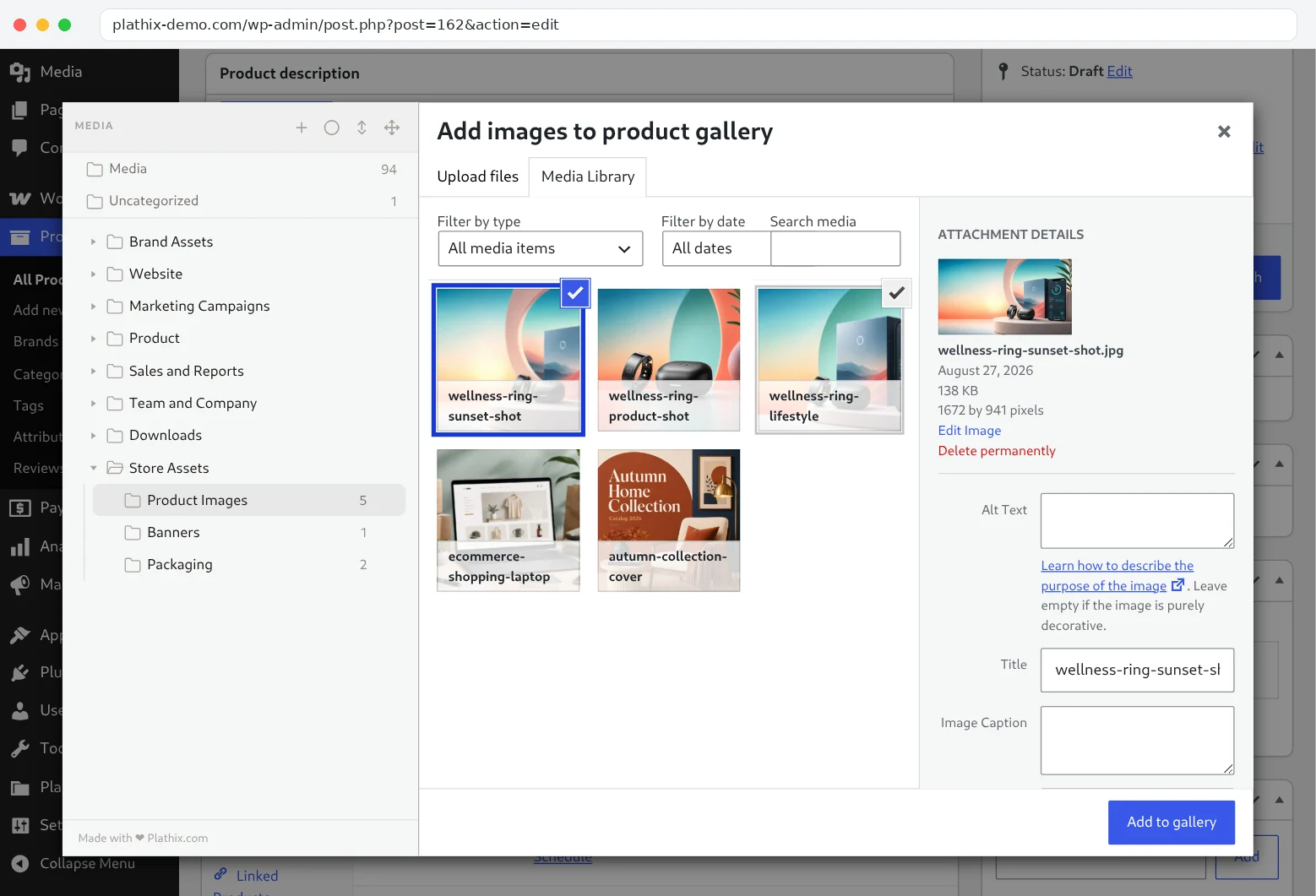
| PK6.3 | Click Add product gallery images, open a folder and pick two files. Both end up in the product gallery. | Passed |
Watch the checkHow we checked. On the same product clicked Add product gallery images, opened Store Assets → Product Images, selected two photos with Ctrl and clicked Add to gallery. What you see. Two files selected inside one folder, the Add to gallery button, and both thumbnails in the Product gallery box afterwards. Recorded on 22 Sep 2026 on plathix-demo.com: WordPress 7.1, Twenty Twenty-Five, Plathix 1.0.0 Free. |
||
Known limitations
- WooCommerce keeps the CSV file you import in the Media Library. That is WooCommerce’s doing, not ours; the file lands in Uncategorized like any other upload.
Test setup
- Install and activate Plathix. There is no WooCommerce setting to turn on.
- Optional: create one folder per product category, then select the products’ images in the Media Library and drag them into those folders. A folder change does not move the file on disk or change its attachment ID, so existing product images keep their media location.
Retest
Repeated on every Plathix release and on each WooCommerce major release.